Shopify SEO checklist is designed to help beginners improve visibility, attract organic traffic, and build a strong foundation for long-term eCommerce growth in 2026.
Organic search remains one of the most reliable ways to grow a Shopify store.
This Shopify SEO checklist focuses on practical, beginner-friendly optimizations.
Shopify SEO Checklist: Step-by-Step Guide!
1. Do the quick setup (analytics & console)
Before you start making changes, connect measurement and discovery tools:
- Install Google Analytics 4 (with ecommerce tracking) and enable essential events (add-to-cart, checkout start, purchase).
- Add your site to Google Search Console and submit your sitemap (
/sitemap.xml).
These tools let you spot indexing problems and track which SEO changes actually move the needle.
2. Keyword basics — map intent, not just words
- Choose one primary keyword per product page and one per major collection page.
- Use Google autocomplete, People Also Ask, or basic keyword tools to find long-tail phrases that match buyer intent (e.g., “affordable men’s cotton tee” vs. “t-shirt”).
- Blog posts should target informational queries that lead to product pages via internal links. This mapping prevents keyword cannibalization and makes each page more focused.
3. Product pages — titles, descriptions, and schema
- Title tag: Put the primary keyword early and keep it under ~60 characters.
- Meta description: 150–160 characters; include the keyword once and a compelling CTA.
- Product description: Lead with benefits, include the keyword naturally, then list features in bullets. Avoid copying supplier text — duplicate content is a common trap. Add product schema (price, availability, rating) to enable rich snippets.
4. Image SEO & performance (high leverage)
- Rename image files before upload (e.g.,
blue-cotton-tee.jpg) and add descriptive alt text. - Compress images and aim for hero/product images under ~200–300 KB (use WebP where supported). This both improves page speed and image search visibility.
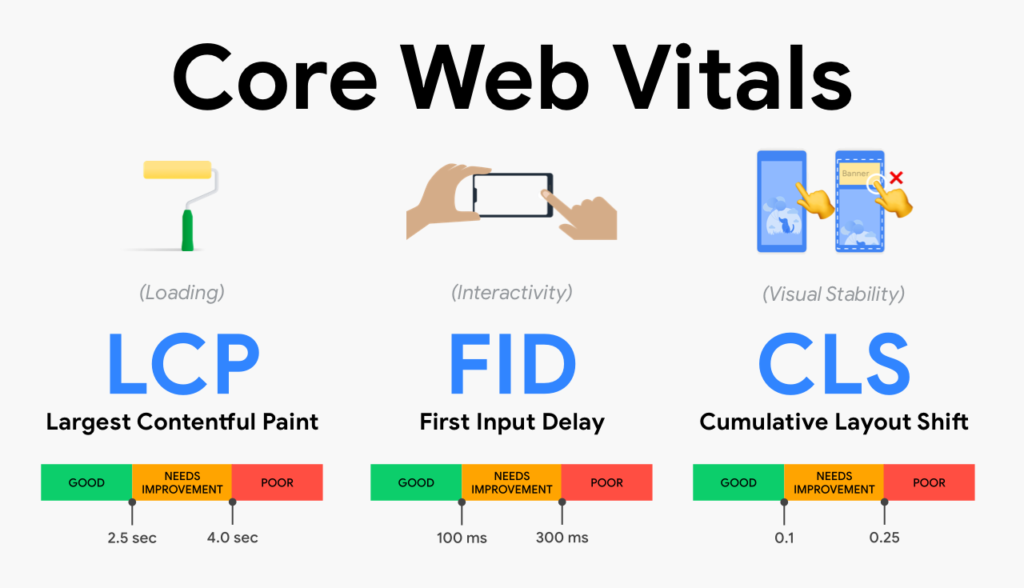
5. Speed & Core Web Vitals — prioritize LCP, CLS, INP
- Remove unused apps and heavy third-party scripts.
- Reduce large sliders, autoplay video, and oversized hero images.
- Test with PageSpeed Insights and Shopify’s speed report; fix the top 2–3 issues first. Faster pages improve both rankings and conversions.
Following this Shopify SEO checklist ensures that every important ranking factor is covered.
6. Mobile-first UX
- Ensure fonts are readable, buttons are tappable, and menus are simple. Google uses mobile-first indexing, so mobile issues can block ranking improvements even if desktop looks great. Test actual devices, not just emulators.
7. Site structure & internal linking
- Keep a shallow, logical hierarchy (Home → Collections → Product).
- Use blog posts to target long-tail informational queries, and internally link those posts to related collection/product pages. This distributes link equity and helps crawlers find important pages.
8. Handle duplicates, variants & redirects
- Shopify can create multiple URLs for variants. Use canonical tags to consolidate signals and avoid duplicate-content issues. If you remove a product, create a 301 redirect to a relevant collection or similar product.
9. Structured data & rich results
- Add FAQ schema for blog posts where appropriate and product schema for product pages. Structured data increases the odds of rich snippets (ratings, price, FAQs) which improves CTR. Many Shopify themes/plugins help add basic schema automatically.
10. Track, test, repeat
- Weekly quick audit: check Search Console coverage, run PageSpeed on homepage + high-traffic product page, and add 1–2 internal links from a recent blog into product pages. Keep an SEO log (what changed, when, and impact).
Common mistakes to avoid (short list)
- Copying supplier descriptions (duplicate content).
- Overloading the store with apps and scripts.
- Forgetting image alt text and proper file names.
- Not submitting the sitemap or ignoring Search Console errors.
Final thoughts
SEO is ongoing. Start with keyword mapping, product page basics, image and speed improvements, and a simple blogging plan. Small, consistent improvements compound into meaningful traffic and revenue growth — and if your store is large or in a competitive niche, specialist help can accelerate results.